Lab Tips : Remote DNS Management

In home lab scenarios, it's typical to need to create or delete DNS A-records. Although accessing the AD server via RDP to create DNS records might seem straightforward, it can sometimes slow you down unnecessarily.
Here are some tips to help you save time.
Use RSAT DNS Tools (this is an optional feature that can be installed on your Windows client machine)
Use nsupdate (if your jumpbox is a Linux or Mac)
Other alternatives:
Use PowerShell Remoting
DNS REST API
In this blog, I'll just cover the use of RSAT and PowerShell Remoting as methods to save time from a Windows jump host.
Using RSAT.DNS.Tools
RSAT.DNS.Tools is a Microsoft provided optional feature that can be installed on Windows.
Use the following procedure to install it on a windows machine:
Note: The following procedure was run on a Windows 11 machine:
Check if RSAT.DNS.Tools are installed by running the following command:
Get-WindowsCapability -Name Rsat.dns* -OnlineIf not Installed, run the following command to install RSAT.DNS.Tools.
Add-WindowsCapability -Online -Name Rsat.Dns.Tools~~~~0.0.1.0Once installed, confirm it is installed by running the get-windowscapabiliy command again
Get-WindowsCapability -Name Rsat.dns* -Online
Once you have RSAT installed, Run (Win+R) “dnsmgmt.msc”


This should simply bring up DNS Manager connected to the AD server and you can manage the DNS entries as usual.

RSAT DnsServer Powershell Module Method
Now, if you are not keep to the DNS Manager UI, you can use RSAT’s DnsServer powershell module to create/delete DNS-A records.
# Syntax to create a DNS-A record
Add-DnsServerResourceRecordA -Name "<hostname>" -ZoneName "<domain_name>" -IPv4Address "<IP for the record>" -ComputerName "<domain_controller_hostname>"

# Syntax to view a DNS-A record
Get-DnsServerResourceRecord -ZoneName "<domain_name>" -Name "hostname" -ComputerName "<domain_controller_hostname>"
# Syntax to delete a DNS-A record
Remove-DnsServerResourceRecord -ZoneName "<domain_name>" -Name "hostname" -RRType "A" - ComputerName "<domain_controller_hostname>"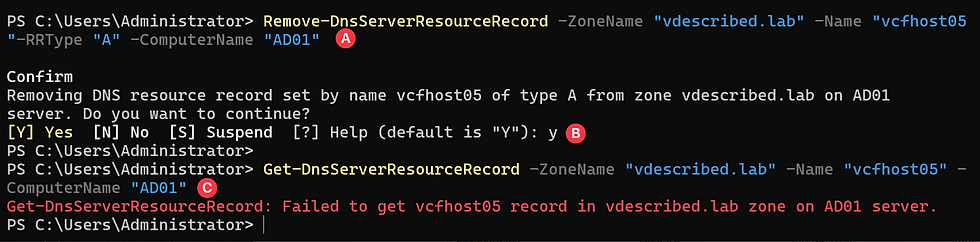
Using Windows PowerShell Remoting
If you do not want to install RSAT on your machine, you can instead use Windows PowerShell Remoting to simply run the DNS command on the AD server without having to install anything on the client machine using the Invoke-Command cmdlet.
The command to add/view/remove the records are exactly the same. It is just that you are now invoking the command directly from the AD server and not from your client machine.
Syntax:

Invoke-Command -ComputerName <domain_controller_hostname> -ScriptBlock {
    Add-DnsServerResourceRecordA `
        -Name "<hostname>" `
        -ZoneName "domain_name" `
        -IPv4Address "IP_for_A-record"
}

Comments